> For the complete documentation index, see [llms.txt](https://exploit-pack.gitbook.io/exploit-pack-manual-pages/llms.txt). Markdown versions of documentation pages are available by appending `.md` to page URLs; this page is available as [Markdown](https://exploit-pack.gitbook.io/exploit-pack-manual-pages/master/sidekick-feature.md).
# Sidekick Feature
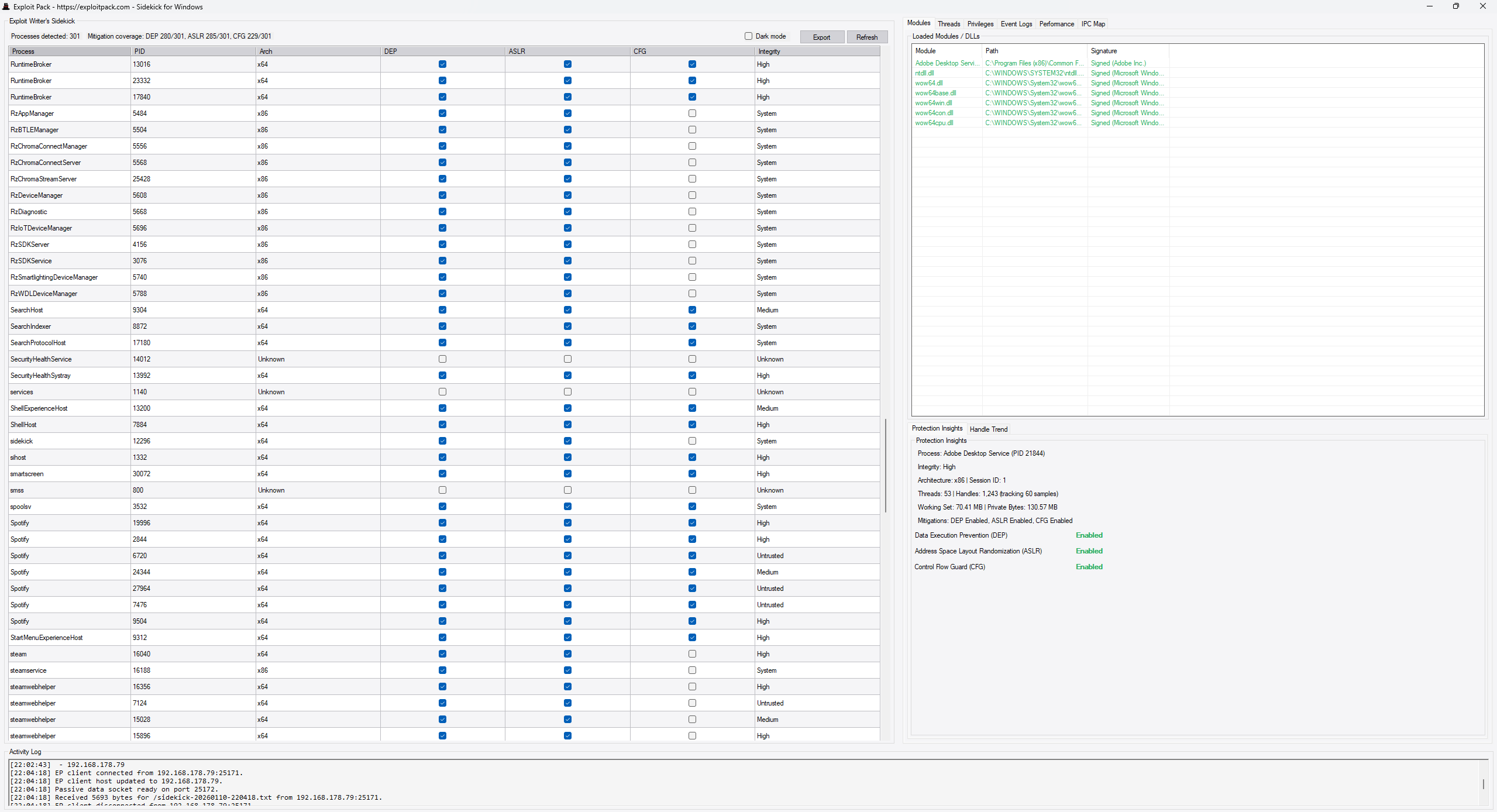
**Sidekick** is a Windows companion agent for Exploit Pack, that provides live system visibility and remote execution capabilities during exploit development.
It allows Exploit Pack to:
* Inspect running processes on a target
* Identify exploit mitigations (DEP, ASLR, CFG)
* View process architecture and integrity levels
* Deploy exploits directly to the target
* Execute exploits remotely from the Exploit Pack interface
* Support advanced debugging workflows (Ghidra integration)
Sidekick is designed to support exploit writers by reducing guesswork and manual target inspection and by integrating target interaction directly into the Exploit Pack workflow.
When Sidekick is running on a system, Exploit Pack gains visibility into the target environment.
#### Live Process Inspection
Sidekick displays detailed information about running processes, including:
* Process name and PID
* Architecture (x86 / x64)
* DEP (Data Execution Prevention) status
* ASLR (Address Space Layout Randomization) status
* CFG (Control Flow Guard) status
* Process integrity level (System / High / Medium / Untrusted)
This information helps exploit developers quickly determine:
* Which processes have weaker mitigations
* Which targets are more suitable for exploitation
* Whether mitigations must be bypassed
* What constraints apply to payload execution
This eliminates the need for external tools such as Process Explorer or manual PowerShell inspection.
### Remote Execution via Exploit Pack
Sidekick integrates directly with Exploit Pack’s interface.
From Exploit Pack, go to the upper right corner:
* First, select an IP address
* Click **Deploy** to execute the exploit on the remote system
* Click **Send** to transfer your exploit to the target. You will hear an audible notification, and the main Sidekick window will open automatically.
This enables a workflow where exploit development happens locally while execution occurs on the real Windows target without manually copying files or logging into the system.
Typical workflow:
1. Sidekick runs on the Windows target
2. Exploit Pack connects to Sidekick
3. Exploit code is written or edited inside Exploit Pack
4. The exploit is sent to Sidekick
5. Sidekick executes it locally
6. Results can be observed and iterated on immediately
### Debugging Support (Ghidra Integration)
Sidekick supports remote debugging workflows through integration with Ghidra (using the Sidekick plugin).
This allows developers to:
* Attach Ghidra to processes running on the Sidekick target
* Observe execution flow while exploits are triggered
* Perform dynamic analysis during exploit development
* Improve exploit reliability through iterative debugging
This is especially useful when developing complex exploits that require precise control over memory and execution behavior.