> For the complete documentation index, see [llms.txt](https://exploit-pack.gitbook.io/exploit-pack-manual-pages/llms.txt). Markdown versions of documentation pages are available by appending `.md` to page URLs; this page is available as [Markdown](https://exploit-pack.gitbook.io/exploit-pack-manual-pages/control-pack/stage-2.md).
# Stage 2
Get the power of Control Pack agents. Made for professional Penetration Testing and Red Teams.
### Overview
Stage 2 is where a quiet, stealthy connection becomes a full working session. Think of Stage 1 as the agent’s handshake and Stage 2 as handing the operator the keys to a richly instrumented diagnostic workshop. When the agent moves to Stage 2, the environment changes from “observe and stay hidden” to “interact and confirm”.
### Purpose
Stage 2 is intended to:
* Provide deeper situational awareness of the target.
* Enable controlled data collection.
* Support diagnostic workflows that require more capabilities than a Stage 1 connection.
### What changes
* The agent sheds its minimal, connection-only posture and adopts a broad set of capabilities that let the host see and interact with the target in much greater detail.
* From that point forward, the operator can perform deeper investigations, collect artifacts for analysis, and run operations.
### Stage 2 Capabilities
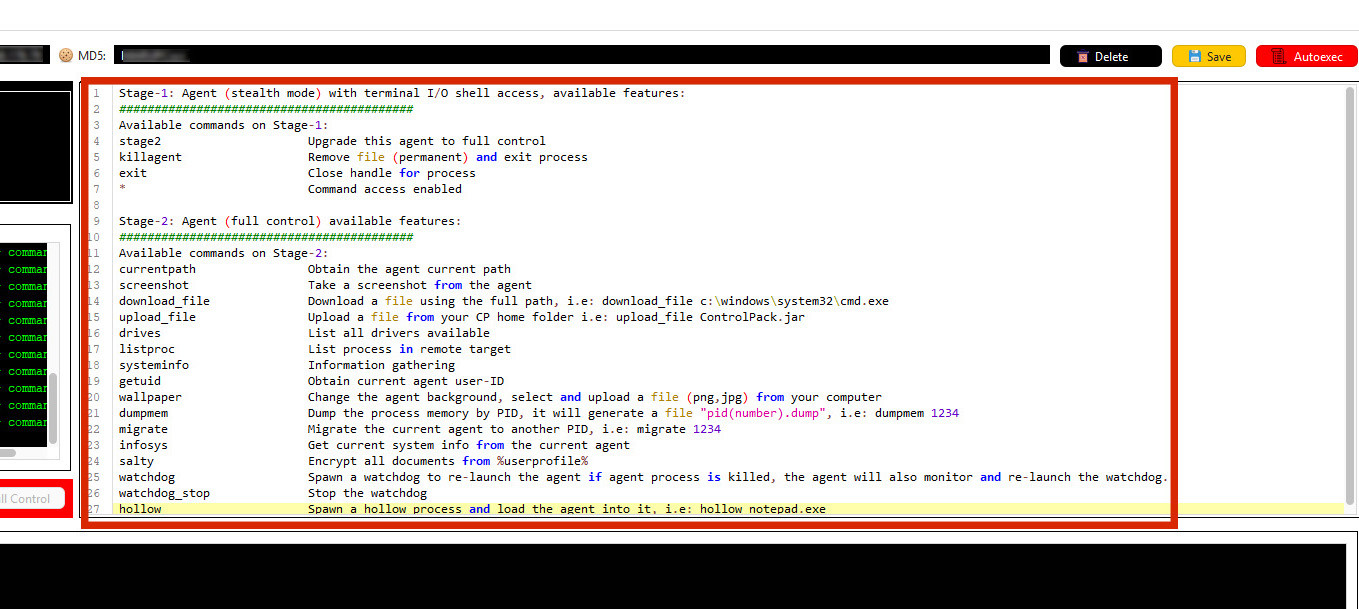
When Stage 2 is active, the operator has access to a set of advanced features, which include:
* **File transfer and management**: bidirectional transfer of files to and from the target for validated diagnostics.
* **System and environment enumeration**: collection of system data (OS version, architecture, available volumes).
* **Process inspection**: visibility into running processes.
* **Interactive operational control**: actions to support diagnostics.
* **User context and identity information**: reporting of the agent’s runtime user/context for audit and access decisions.
* **Persistence and resiliency controls**: mechanisms to maintain a session during testing.
* **User-facing UI changes**: non-destructive UI changes (for example, changing a wallpaper).
### Some of the capabilities on Stage 2
Each agent has different capabilities, but some of them include:
* currentpath - Obtains the agent's current path
* screenshot - Takes a screenshot from the target
* download\_file - Downloads files
* upload\_file - Uploads files from your CP home folder
* drives - Lists all drivers available
* listproc - Lists processes in the remote target
* systeminfo - Information gathering
* getuid - Obtains current agent user-ID
* wallpaper - Changes the target's background
* dumpmem - Dumps the process memory by PID
* migrate - Migrates the current agent to another PID
* infosys - Gets current system info
* salty - Encrypts all documents
* watchdog - Spawns a watchdog that re-launches the agent. Also, If the agent process is killed, it will monitor and re-launch the watchdog as well
* watchdog\_stop - Stops the watchdog
* hollow - Spawns a hollow process and loads the agent into it, i.e, hollow notepad.exe
### Activating Stage 2
The system transitions an agent from Stage 1 to Stage 2 through an upgrade operation. Once upgraded, the full set of Stage 2 features becomes available via the Control Pack interface or console. To initiate the upgrade, just write "stage2" on the console of Control Pack.
{% hint style="danger" %}
**Before using Stage 2 capabilities:**
1. **Always obtain a signed scope and authorisation** **document** for any target system. It should include dates, target identifiers, and allowed actions.
2. **Isolation**: perform high-risk operations (memory capture, persistence testing) only in segregated labs or on expressly authorised targets.
3. Confirm backup and restore points exist for production systems before any intrusive testing.
{% endhint %}